

Account Contact
Your Cart
Black Weekup to −30%ends in 4 d 10:45:30
DPD & FedEx – delivery date on the product page
Need help? Ask our AI

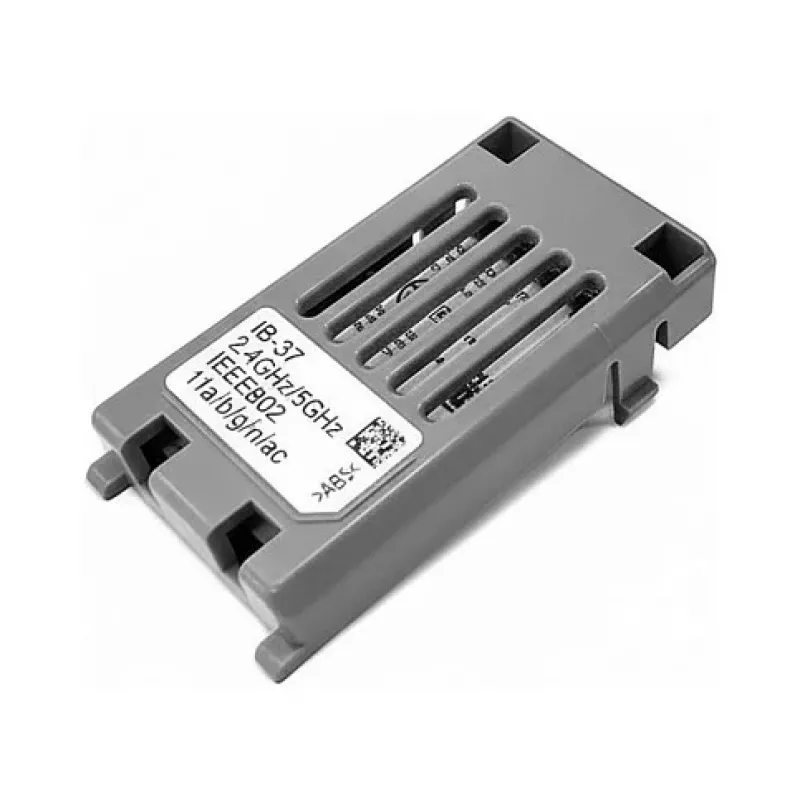
Kyocera IB-37 Interface Card (MPN 1503T80UN0) – Network Connectivity Module for Compatible Kyocera Printers

Kyocera IB-37 Interface Card (MPN 1503T80UN0) – Network Connectivity Module for Compatible Kyocera Printers
-11%
Black Week
Kyocera IB-37 Interface Card (MPN 1503T80UN0) – Network Connectivity Module for Compatible Kyocera Printers
128.22 €
143.94 €−11 %
PDF
PDF

Shipping & Returns

Estimated delivery Monday, 14 December
You will be kept updated through our detailed tracking system
Payment options
Bank CardVisaMastercardApple PayGoogle PayBank Transfer

Ask a question – the AI assistant answers instantly.

Description

The Kyocera IB-37 interface board is a network connectivity module designed to add LAN printing capabilities to compatible Kyocera printers. Installed into the printer's expansion slot, this factory-specified option enables network discovery, shared printing and centralized management without replacing the existing device. The module supports standard network printing protocols and integrates with typical office LAN environments to allow multiple users to send print jobs over wired Ethernet connections.

Advantages

The interface board provides a stable wired network connection and allows printers to be shared across departments, reducing the need for direct USB connections to individual workstations. Installation maintains the original printer firmware compatibility and preserves device functionality while adding network features. By enabling centralized queue management and standard network protocols, the module helps streamline print job distribution and monitoring in mixed-device networks.

Suitable for

  • Small to medium office networks requiring shared printer access
  • Environments with centralized print management or print servers
  • Workgroups needing reliable wired Ethernet connectivity for printing
  • IT setups integrating Kyocera printers into existing LAN infrastructure

Key specifications

  • Function: wired network interface for compatible Kyocera printers
  • Supported connectivity: 10/100 Mbps Ethernet (wired LAN)
  • Compatibility: designed for specific Kyocera printer series that accept expansion interface modules
  • Protocols: standard network printing protocols supported (e.g., LPR/LPD, IPP, and common TCP/IP services)
  • Physical form factor: expansion board/module for internal installation in the printer

How to use

Power off the printer and install the interface board into the designated expansion slot following the manufacturer’s mechanical and electrical alignment points. After securing the module, connect an Ethernet cable from the board's RJ-45 port to the office network switch or router. Power on the printer and use the printer control panel or web-based configuration interface to assign an IP address (via DHCP or manual configuration), enable required network services and verify connectivity. Ensure the latest printer firmware is applied and add the networked printer on user workstations using the appropriate driver and protocol.

Recommendations

Use a managed switch or network segment with appropriate security settings to restrict print service access. Keep printer firmware and network module drivers up to date, and, where available, configure static IP addressing or DHCP reservations for easier management. For larger deployments, integrate the device with centralized print management tools and monitor usage to optimize network and print resource allocation.

Key Highlights
  • Small to medium office networks requiring shared printer access
  • Environments with centralized print management or print servers
  • Workgroups needing reliable wired Ethernet connectivity for printing
  • IT setups integrating Kyocera printers into existing LAN infrastructure
  • Function: wired network interface for compatible Kyocera printers
  • Supported connectivity: 10/100 Mbps Ethernet (wired LAN)
  • Compatibility: designed for specific Kyocera printer series that accept expansion interface modules
  • Protocols: standard network printing protocols supported (e.g., LPR/LPD, IPP, and common TCP/IP services)
  • Physical form factor: expansion board/module for internal installation in the printer
Price history over the last 6 months
Kyocera IB-37 Interface Card (MPN 1503T80UN0) – Network Connectivity Module for Compatible Kyocera Printers
Current
128.22 €
Lowest 7d
128.22 €
Highest 7d
184.85 €
Change 24H
-15.72 €   -11%
Change 7D
-54.68 €   -30%
Change 30D
-10.17 €   -7%

Write a review

Rating *
Note: HTML is not translated!

More KYOCERA products in this category

12

Popular products in this category

7
Seller: UAB KUR LT · Gariūnų g. 57-14, LT-02300 Vilnius, Lithuania · Company code 303192950 · VAT number LT100008198612 · Ships from the EU (Lithuania)
WhatsApp
Messenger
Hi, I’m DistriNode’s AI assistant. I can help you find products, compare options, create quote PDFs, or open support requests.
All categories