
Account Contact
Your Cart
Black Weekup to −30%ends in 3 d 02:14:03
DPD & FedEx – delivery date on the product page
Need help? Ask our AI

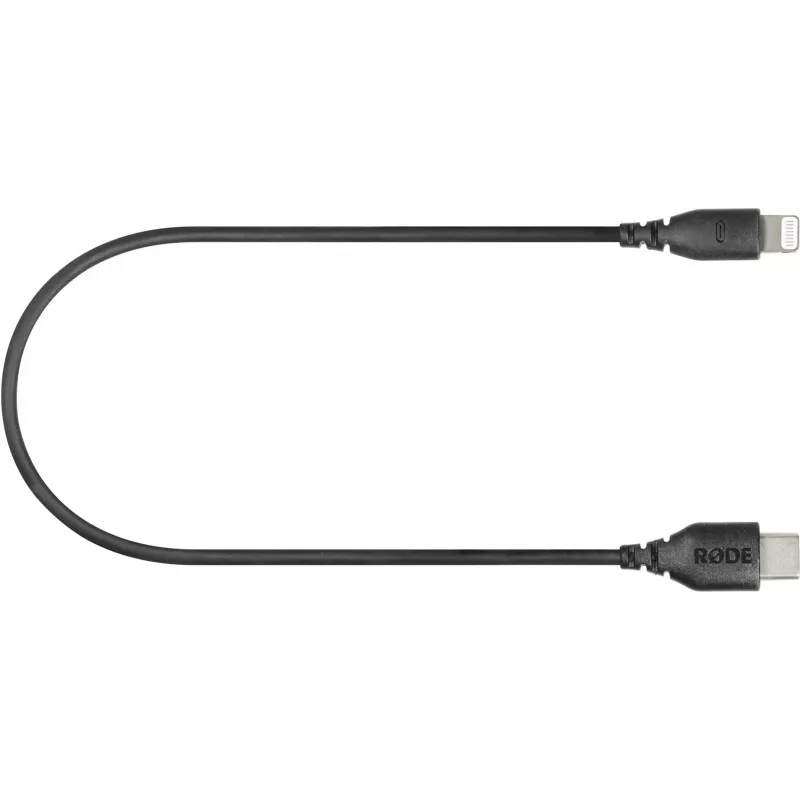
RØDE SC21 Cable 0.3 m Lightning to USB-C 6 g

RØDE SC21 Cable 0.3 m Lightning to USB-C 6 g
-16%
Black Week
RØDE SC21 Cable 0.3 m Lightning to USB-C 6 g
30.88 €
36.67 €−16 %
PDF
PDF
Stock 4 Code 27677 Model SC21 Warranty 2 Years

Shipping & Returns

Estimated delivery Thursday, 10 December
You will be kept updated through our detailed tracking system
Payment options
Bank CardVisaMastercardApple PayGoogle PayBank Transfer

Ask a question – the AI assistant answers instantly.

Description

The RØDE SC21 is a 0.3 m (30 cm / 11.8") round Lightning to USB‑C cable designed to connect MFi‑certified USB‑C microphones and accessories to iOS devices. Lightweight and compact, the cable provides a straightforward wired connection between compatible microphones (such as the RØDE Wireless GO II and AI‑Micro) and iPhone or iPad devices equipped with a Lightning port.

Advantages

The SC21 offers a durable round jacket and a compact length that reduces excess cable when used with mobile devices. Its Lightning and USB‑C terminations ensure compatibility with MFi‑certified USB‑C microphones. The cable’s low weight (approximately 6 g) and small size make it convenient for mobile recording setups and simple to carry.

Suitable for (tasks / use cases)

  • Connecting RØDE Wireless GO II to iPhone or iPad
  • Connecting RØDE AI‑Micro to iOS devices
  • Mobile audio recording with MFi‑certified USB‑C microphones
  • Compact podcasting and vlogging setups using Lightning devices

Key specifications

  • Connector 1: Lightning
  • Connector 2: USB‑C
  • Cable length: 0.3 m (30 cm / 11.8")
  • Weight: 0.006 kg (6 g)
  • Colour: Black
  • Brand: RØDE
  • MPN: 400830098
  • EAN: 0698813007486

How to use

Plug the USB‑C end into the USB‑C output of a compatible MFi‑certified microphone or accessory, and insert the Lightning connector into the iPhone or iPad Lightning port. Verify that the microphone or accessory is recognised by the iOS device and select it as the audio input in the recording app. The short cable length is intended for close, mobile use to minimise slack and keep the setup tidy.

Recommendations

Use the cable with MFi‑certified USB‑C microphones and keep connectors free of dust and moisture. Avoid sharp bends near the connector ends and store the cable loosely coiled to extend service life.
Key Highlights
  • Connecting RØDE Wireless GO II to iPhone or iPad
  • Connecting RØDE AI‑Micro to iOS devices
  • Mobile audio recording with MFi‑certified USB‑C microphones
  • Compact podcasting and vlogging setups using Lightning devices
  • Connector 1: Lightning
  • Connector 2: USB‑C
  • Cable length: 0.3 m (30 cm / 11.8")
  • Weight: 0.006 kg (6 g)
  • Colour: Black
  • Brand: RØDE
  • MPN: 400830098
  • EAN: 0698813007486

Specifications

Specifications
Cable length
0.3 m
Cable type
Round cable
Connector 1
Lightning
Connector 1 form factor
Straight
Connector 1 gender
Male
Connector 2
USB C
Connector 2 form factor
Straight
Connector 2 gender
Male
Product colour
Black
Quantity per pack
1 pc(s)
Weight
0.006 kg

Leaflet

Open Leaflet

Document

Open Document
Price history over the last 6 months
RØDE SC21 Cable 0.3 m Lightning to USB-C 6 g
Current
30.88 €
Lowest 7d
30.88 €
Highest 7d
36.67 €
Change 24H
-5.78 €   -16%
Change 7D
-3.50 €   -10%
Change 30D
-5.78 €   -16%

Write a review

Rating *
Note: HTML is not translated!

More RODE products in this category

3

Popular products in this category

8
Seller: UAB KUR LT · Gariūnų g. 57-14, LT-02300 Vilnius, Lithuania · Company code 303192950 · VAT number LT100008198612 · Ships from the EU (Lithuania)
WhatsApp
Messenger
Hi, I’m DistriNode’s AI assistant. I can help you find products, compare options, create quote PDFs, or open support requests.
All categories